What's going on in Mr. Solarz' Class?
What's going on in Mr. Solarz's Class?
  • Parents (Newsletter)
    • Our Online Photo Album >
      • 2018-2019 Photo Album
      • 2017-2018 Photo Album
      • 2016-2017 Daily Photo Journal
      • 2016-2017 Daily Photo Journal - Album 2
      • 2015-2016 Daily Photo Journal
      • 2015-2016 Yearbook
      • 2014-2015 Daily Photo Journal
    • Our YouTube Channels >
      • 2018-2019 YouTube Channel
      • 2017-2018 YouTube Channel
      • 2016-2017 YouTube Channel
      • 2015-2016 YouTube Channel
      • 2014-2015 YouTube Channel
      • 2013-2014 YouTube Channel
      • 2012-2013 YouTube Channel
      • YouTube videos over the years
      • Learn Like a PIRATE videos
    • Calendar
    • Our Weekly Schedule
    • FAQ about our classroom
    • Curriculum Night Presentation
  • Educators
    • Danielson Framework >
      • Domain 1 - Planning & Preparation
      • Domain 2 - Classroom Environment
      • Domain 3 - Instruction
      • Domain 4 - Professional Responsibilities
      • Professional ePortfolio
      • Instructional Coach Evidence
      • Experience Logs
    • FAQ about our Classroom
    • Workshops
    • Our Classroom Library is for Sale
  • Curriculum
    • Science Units >
      • 5th Grade >
        • Human Body Unit >
          • Human Body Links
        • Ecosystems >
          • Ecosystems - Legends of Learning
        • Watery Earth >
          • Watery Earth Links
        • Earth in Space
        • Investigating Matter
      • 4th Grade >
        • Energy >
          • Energy Unit Notes
          • Energy Debates
          • Energy Debate Organizers
        • Our Geosphere
        • Waves
      • Science Fair
      • STEM Investigations!
      • Try Engineering Together
    • Social Studies Units >
      • 5th Grade >
        • Revolutionary War >
          • Liberty's Kids Videos
          • Revolutionary War Hero Project >
            • RWHP Directions
        • U.S. Constitution & Government >
          • Mini Lessons
          • Colonize Mars! >
            • Claiming Mars for Ourselves >
              • 2017-2018 Creating our Country on Mars
              • 2016-2017 Mars Decisions
              • 2015-2016 Claiming Mars for Ourselves
              • 2014-2015 Claiming Mars for Ourselves 2015
            • Solutions to Problems on Mars >
              • 2017-2018 Our Solutions to Problems on Mars
              • 2016-2017 Problems & Solutions
              • 2015-2016 Our Solutions to Problems
              • 2014-2015 Our Solutions to Problems
            • 2014-2015 "Mission: Mars" Video Discussions 2015
          • Project Citizen
        • Westward Expansion >
          • Oregon Trail Simulation
          • Oregon Trail Readings
          • Reflection Rotation >
            • 2017-2018 Reflections >
              • ThingLink Photo Stories
              • Green Screen Tableaux Vivants
              • Fictional Travel Blog
              • Canva Concept Cards
              • YouTube Newscasts
              • Google Slide Show
              • Daily Travel Blog
              • Act-It-Outs
            • 2016-2017 Reflections
            • 2015-2016 Reflections >
              • Voki Reflections >
                • Voki Blog
            • 2014-2015 Reflections >
              • Act-It-Outs
              • Timeline Spreadsheet
              • Newscasts
              • ThingLink >
                • ThingLink Images
                • Sign up for ThingLink
              • Google Slideshow
              • Fictional Travel Log
              • Daily Travel Log
              • Tableaux Vivants
              • Photo Stories
      • 4th Grade >
        • Geography
        • Explorers
        • Native Americans
        • Colonization
        • State of Sustainability
      • Presidential Election Simulation - 2012 >
        • Presidential Election Simulation - 2016
      • Current Events
    • Reading >
      • 5th Grade Units >
        • Literature Circles >
          • Literature Circles >
            • Video Discussions
          • Literature Circles >
            • Video Discussions
            • Activities
        • Schoolwide Launch
        • Schoolwide Fiction
        • Schoolwide Non-Fiction
        • Schoolwide Ecosystems
        • Schoolwide Poetry
        • Wonder >
          • Wonder
        • The Phantom Tollbooth >
          • Phantom Tollbooth Assignments
      • 4th Grade Units >
        • Schoolwide Launch
        • Schoolwide Fiction
        • Schoolwide Non-Fiction
        • Schoolwide Poetry
        • Schoolwide Energy
    • Writing, Spelling & Grammar >
      • Writing >
        • Writing City
        • WEX
        • WriteAbout
        • Reflection Writing
        • JoonBugz
      • Spelling >
        • Words Their Way
      • Grammar >
        • Grammar
    • Math >
      • Money Island
      • Math in Focus
    • Miscellaneous >
      • Activities >
        • Short-Term Projects
        • Challenges!
        • Special Events
        • Projects & Mini Lessons
        • Bonus Activities
        • Miscellaneous >
          • Honor Badges
          • Growing a Growth Mindset
      • Imagination Club >
        • Schedule
        • Daily Ritual
        • Mini-Lessons
        • Photo Journal
        • Student Creations Round 1
      • Mystery Skype
      • Entrepreneurship Unit >
        • Entrepreneurship - Creating Our Own Businesses!
      • Self-Reflection
      • KinderPals
  • Student ePortfolios
    • 2018-2019 ePortfolios >
      • Students 1-7 >
        • 1 - Isabel
        • 2 - Alexis
        • 3 - Oscar
        • 4 - Adrian
        • 5 - Edy
        • 6 - Matthew
        • 7 - Molly
      • Students 8-14 >
        • 8 - Joey
        • 9 - Jeremiah
        • 10 - Emmalina
        • 11 - Sama
        • 12 - Hazel
        • 13 - Nick
        • 14 - Filip
      • Students 15-21 >
        • 15 - Nellie
        • 16 - Landon
        • 17 - Molly
        • 18 - Harrison
        • 19 - Kali
        • 20 - Inti
        • 21 - Ryan
        • 22 - Pavel
      • Blog Assignments
    • 2017-2018 ePortfolios >
      • Students 1-9 >
        • Elle
        • Daniel
        • Tommy
        • Alyssa
        • Gavin
        • Milosz
        • Mikey F
        • Caitlin
        • Brynna
      • Students 10-17 >
        • Kya
        • Olivia
        • Ian
        • Colin
        • Owen
        • Gianna
        • Isabella
        • Carmen P
      • Students 18-25 >
        • Lucy
        • Caleb
        • Mikey S
        • Wes
        • Martin
        • Will
        • Shaun
        • Carmen W
      • Blog Assignments
    • 2016-2017 ePortfolios >
      • Students 1-8 >
        • Hailie
        • Jody
        • Madison
        • Dylan
        • Calvin
        • Connor
        • Louisa
        • Harvey
      • Students 9-16 >
        • Anna
        • Jack
        • Ben
        • Elijah
        • Catelyn
        • Cole
        • Abby
        • Ashley
      • Students 17-23 >
        • Charles
        • Michelle
        • Charlie
        • Daniel
        • Sam
        • Chingoon
        • Kyren
      • Blog Assignments
    • 2015-2016 ePortfolios >
      • Students 1-9 >
        • TJ
        • JJ
        • Bridget
        • Alex
        • Mason
        • Ryan
        • Lucas
        • Shreya
        • Logan
      • Students 10-18 >
        • Charlotte
        • Addie
        • Aidan
        • Andrew
        • Jeremy
        • Rachel
        • Russell
        • Addy
        • Cassidy
      • Students 19-26 >
        • Audrey
        • Regan
        • Giuliana
        • Brady
        • Stephen
        • Matthew
        • Ben
        • Tyler
        • Thomas
      • Blog Assignments
    • 2014-2015 ePortfolios >
      • Students 1-7 >
        • 1 - Michael
        • 2 - Charlie
        • 3 - Nicole
        • 4 - Stacy
        • 5 - Bela
        • 6 - Kendall
        • 7 - Demetri
      • Students 8-14 >
        • 8 - Emily
        • 9 - Nicky
        • 10 - Hanna
        • 11 - Payton
        • 12 - Hasanain
        • 13 - Tucker
        • 14 - Chris
      • Students 15-21 >
        • 15 - Madi
        • 16 - Aidan
        • 17 - Luke
        • 18 - Kaela
        • 19 - Ryan
        • 20 - Alison
        • 21 - Lucas
      • Blog Assignments
  • Passion Time
    • Passion Time Resources >
      • ALL Passion Time Resources
      • Step-By-Step Directions
      • Submit Your Essential Question
      • Our Trello Page
      • Our Passion Projects over the years
      • Our Trello Board
      • SAMPLE Blog Post Format
      • YouTube Upload Page
      • Mini-Lessons
    • 2018-2019 Projects >
      • Round 1
      • Round 2
      • Round 3
      • Round 4
    • 2017-2018 Projects >
      • Round 1
      • Round 2
      • Round 3
      • Round 4
      • Round 5
    • 2016-2017 Projects >
      • Submit Your Essential Question
      • Mini-Lessons
      • Round 1
      • Round 2
      • Round 3
      • Round-4
      • Round 5
      • Round 6
    • 2015-2016 Projects >
      • Round 1
      • Round 2
      • Round 3
      • Round 4
    • 2014-2015 Projects >
      • Round 1
      • Round 2
      • Round 3
      • Round 4
      • Round 5
      • Round 6
  • Student-Led Classroom Info
    • Our Learning Experiences
    • 21st Century Skills
    • Whole Class Goals
    • Individual Goals
    • Classroom Jobs
    • Collaborative Responsibilities
    • Rituals & Routines
    • Uses of "Give Me Five"
    • Student-Led Mini-Lessons
    • Lit Circle Signposts
    • Mystery Skype Jobs

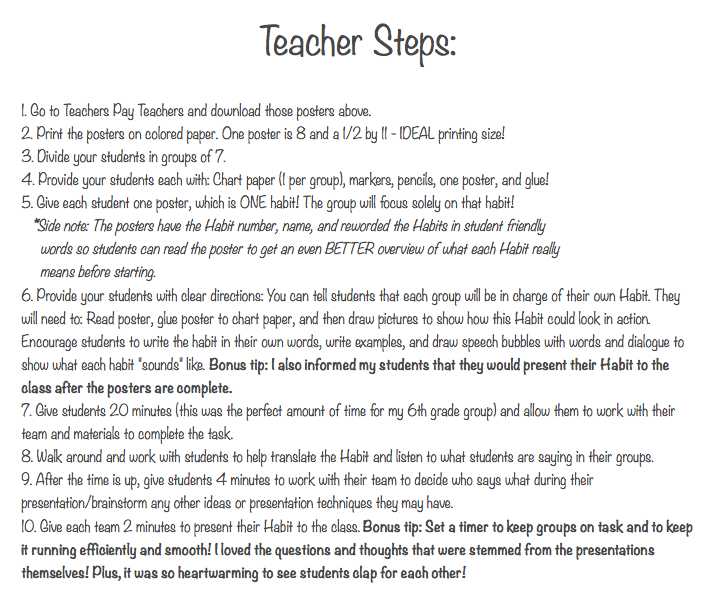
7 Habits Introductory Activity

8/20/2015

0 Comments

 
Originally published here: http://www.growleadserve.com/2015/08/synergize-activity-help-students-find.html
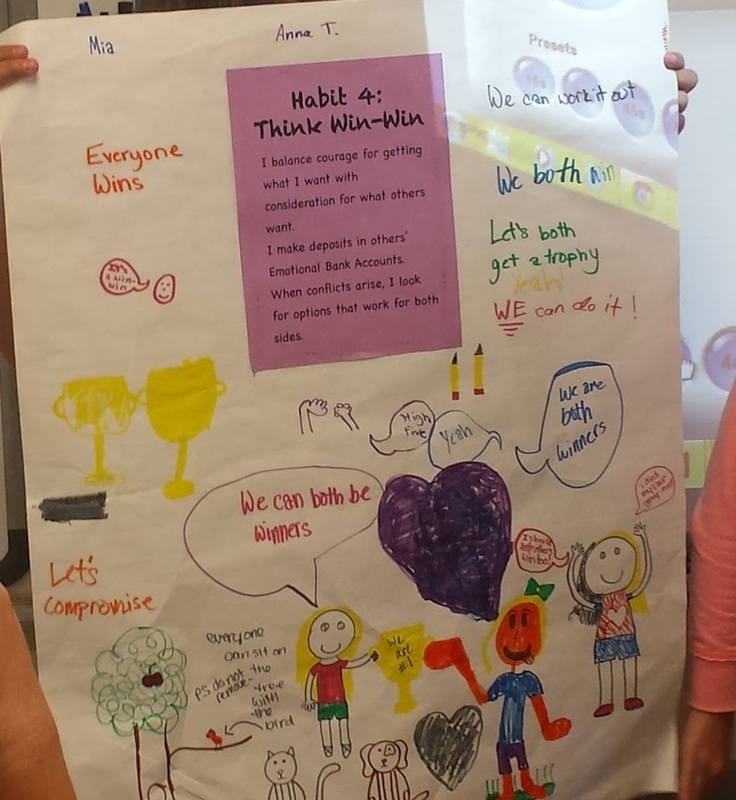
Picture
Picture
theleaderinmeposters.pdf
File Size: 731 kb
File Type: pdf
Download File

0 Comments

End-of-Year Checklist

6/6/2015

0 Comments

 
https://docs.google.com/a/sd25.org/spreadsheets/d/1QUKPDcXbFm9lkGT0bNheTtV5ZNlGjg2FrAvdEmkm3R4/edit?usp=sharing
0 Comments

Mystery Skype Directions

6/5/2015

0 Comments

 
Mystery Skype Rules

- Everyone needs to open up the following tabs on their computer:
  • This tab to see your job below (and the Data Enterers' Google Form at the bottom of this post)
  • Today's Google Doc (see below)
  • Our jobs spreadsheet (or just look at the board in class)
  • Our spreadsheet of questions that we answer.
  • Our spreadsheet of questions that we ask them.
  • A blank tab that you will use for Google searches

- Google Doc rules:
  • Keep the font size, color, and style the same.
  • Don't use the chat feature or the comment field.
  • You only get one question per column, so choose wisely (but feel free to revise as much as you'd like)!
  • Don't be more than one question ahead, because depending on the other team's answers, your question might not make any sense!

- Everyone needs to be actively researching and adding intelligent questions to the Google Doc throughout the Mystery Skype
.

- Please be good and try hard!  I don't want this to be a waste of our time!  Thanks!  :)


TODAY'S GOOGLE DOC:
  • Mystery Skype Google Doc #0
  • Mystery Skype Google Doc #1
  • Mystery Skype Google Doc #2
  • Mystery Skype Google Doc #3
  • Mystery Skype Google Doc #4
  • Mystery Skype Google Doc #5
  • Mystery Skype Google Doc #6
  • Mystery Skype Google Doc #7
  • Mystery Skype Google Doc #8
  • Mystery Skype Google Doc #9
  • Mystery Skype Google Doc #10
  • Mystery Skype Google Doc #11
  • Mystery Skype Google Doc #12
  • Mystery Skype Google Doc #13
  • Mystery Skype Google Doc #14
  • Mystery Skype Google Doc #15
  • Mystery Skype Google Doc #16
  • Mystery Skype Google Doc #17
  • Mystery Skype Google Doc #18
  • Mystery Skype Google Doc #19
  • Mystery Skype Google Doc #20
  • Mystery Skype Google Doc #21
  • Mystery Skype Google Doc #22
  • Mystery Skype Google Doc #23
  • Mystery Skype Google Doc #24
  • Mystery Skype Google Doc #25

Mystery Skype Roles:
  • Researchers (Everyone): This is the most important job and one that everyone needs to do. Everyone needs an atlas and a computer to do this job.  Look up the answers to questions we are asked, AND come up with questions to ask the other class by adding them to the Google Doc.  When you post a question on the Google Doc, be sure to type your name in parentheses after the question mark, otherwise the Questioners can't use it.  We can use Google Maps, search engines, and any other tools that will help you find where they are located that is allowed at our school.  (Everyone does this in addition to their other role.)
  • Greeters/Sharers: Greet the partner school & make the initial introduction. Be specific by stating your names.  Share something special about Westgate without saying the name of our school! It could be a song/dance, souvenir, but nothing that will give anything away.  Feel free to practice this before you have to do it for real. Introduce the questioners by name and offer the other school a chance to introduce themselves. Wrap it up and ask them if they'd like to ask the first question.  (2-3 students)
  • Questioners: You are responsible for asking and answering all of the questions. When it comes to answering questions, make sure you give everyone in the class a chance to prove their answer to you (we are not allowed to give wrong answers). When it's our turn, ask the other school questions that help us learn their whereabouts. You are responsible for keeping the conversation going (remember to treat them kindly and not be too competitive).  Questions are kept on our Google Sheet, so all Questioners can see them and so others in the room can have their questions asked.  Be aware of whose turn it is to ask questions (ours or theirs), and be quick to decide our question when it is our turn (be reading the Google Doc while the other team is thinking or speaking). (3 students)
  • Questioners' Assistants: You are the only people who are allowed to talk to the Questioners (except when Researchers are proving an answer to them).  Whenever the Questioners need the Researchers to do anything, it is your job to quietly ask the Researchers to do it.  Be specific with what you are asking for (e.g. "The Questioners need a question. Let's try to narrow down which part of the state they live in."). (2-4 students)
  • Photographers: Responsible for taking lots and lots of high-quality photos while everyone is working.  Before the Mystery Skype is over, it is important to upload the pictures to our Daily Photo Journal.  If you use the iPads, download the photos via Dropbox, drag them into iPhoto to edit them, and then put them into a blog entry. (2-3 students)
  • Videographers: Responsible for videotaping portions of the event, especially the dialogue between schools and specific people doing their jobs.  Please don't spend a ton of time recording the other class - your job is mostly to record us.  Our videos cannot be shaky, so move slowly from one place to the next.  Don't zoom in and out - there's no need for it!  Before the Mystery Skype ends, upload each video to YouTube and embed the good ones on our Daily Photo Journal. (2-3 students)
  • Data Enterers: Enter questions and answers into our Google Form.  (The entries will appear in the Mystery Skype spreadsheet.  This is important because we will need to look at our previous questions and answers to make sure we don't repeat anything! (2 students - one for our Q&A's, one for their Q&A's)
  • Closers: Wrap up the Mystery Skype by thanking the other class and asking some questions that show an interest in their location and/or school.  If we have time, try to see if we have any interests in common and maybe we can connect with them again in the future. (2-3 students)
  • Signers: Create signs that tell the other class whose turn it is.  Hold up those signs at appropriate times during the Mystery Skype.  Signs we've used in the past include: "Your Turn," "Our Turn - Please wait while we prepare," and "Great Job!" (2 students)
  • Task Masters: Walk around and VERY NICELY help people stay on task.  You may need to show some kids how to do things online, so be willing to be a teacher!  Don't do anything silly in front of the camera! (2-4 students)
  • Google Doc Cleaner-Upper: Whenever a question is asked by the Questioners, bold it so we remember which one was chosen.  Then, paint the column gray so students will know we are done with that column.  Keep your cursor in the proper column whenever possible to help others know where we are.  Make sure our Google Sheet stays neat and clean.  Help others remember to type in their own row.  If students are not typing many questions, offer them help so they are more confident. (1-2 students)
  • Linkers: While you are researching, add links to the Google Doc for others to see the great resources that you find.  Encourage others to add links that will help people as well. (0-2+ students)
  • Question Focuser: Watch the Google Doc and help those who are asking questions that are not possible or too specific.  Walk up to them and work with them to make questions better. (0-2 students)


So what is a Mystery Skype?  Well, check out these articles to get a better idea:
  • http://yollisclassblog.blogspot.com/2011/06/mystery-skype-call-with-langwitches.html
  • http://mravery.edublogs.org/2011/06/14/mystery/
  • https://sites.google.com/site/moreseedstosuccesswithskype/02-skype-jobs-video-and-chart
  • Information about Mystery Skype


Suggestions for making our Google Spreadsheet better:
  • Use capital letters and correct end punctuation.
  • Start each question with a "Q:" and each answer with an "A:".

0 Comments

HBRP Intro and Conclusion

3/18/2015

0 Comments

 
https://docs.google.com/a/sd25.org/document/d/1XHv-2BGxVyI8y_H2w0koatHkOigTBzV9XJGC7xJu708/edit?usp=sharing

0 Comments

Setting up Your Prodigy Game Account

3/10/2015

0 Comments

 
I gave you your UserName and Password in class.  Here is the link: https://prodigygame.com/USA/
0 Comments

Setting up your Money Island Account

2/17/2015

0 Comments

 
Go to: https://firstambank.moneyisland.com/

Click on "Play."

Sign in as me:
- UserName: Solarz
- Password: password

Type in your name in the empty box.

Click "Done."

Copy & paste your sign-in.  Then, click on the "X."

Log in as Child.

Use the code you copied.

Your password is your 151 number.

Take a screen shot of your user name and password.
0 Comments

100 Word Challenge

1/31/2015

0 Comments

 
Click here.


0 Comments

Imagination Club Survey

1/29/2015

0 Comments

 
Please click here: http://fluidsurveys.com/s/imagination-chapters-creativity-survey-january-2015/

Afterwards, practice your History Alive 15 quiz on the Online Tutorial here:
http://tutorial.teachtci.com/

0 Comments

Science Fair Sign-Up

1/14/2015

0 Comments

 
If you are doing your Science Fair project in class with me, you need to sign up for a time to work with me (during Homework Club) AND you need to get your materials ready BEFORE we meet!

Here is the link to the sign-up: https://docs.google.com/a/sd25.org/spreadsheets/d/1yTv7k-oNg0A2li3vxpCJEnIAdsFKO2s0pMEEi0SQtlc/edit?usp=sharing
0 Comments

Moving Our Bones

1/3/2015

0 Comments

 
Sign in to Science Companion: http://sd25.sciencecompanionprime.com

Read the SRB chapter for this lesson: http://sd25.sciencecompanionprime.com/tutti/apps/mediavault/openFile.svc?fileId=90FC9D0B2CBC49428FF4919B9C54892F


Complete the following questions:
http://sd25.sciencecompanionprime.com/tutti/content/activity/launchViewer.svc?activityId=C8E8FFBFEF0947948CF52F7A83DC626A&reviewUserId=&getUserData=1&doSave=1&readOnly=0
0 Comments
<<Previous

    Author

    Write something about yourself. No need to be fancy, just an overview.

    Archives

    August 2015
    June 2015
    March 2015
    February 2015
    January 2015
    December 2014
    November 2014
    September 2014

    Categories

    All

    RSS Feed

Powered by Create your own unique website with customizable templates.