What's going on in Mr. Solarz' Class?
What's going on in Mr. Solarz's Class?
  • Parents (Newsletter)
    • Our Online Photo Album >
      • 2018-2019 Photo Album
      • 2017-2018 Photo Album
      • 2016-2017 Daily Photo Journal
      • 2016-2017 Daily Photo Journal - Album 2
      • 2015-2016 Daily Photo Journal
      • 2015-2016 Yearbook
      • 2014-2015 Daily Photo Journal
    • Our YouTube Channels >
      • 2018-2019 YouTube Channel
      • 2017-2018 YouTube Channel
      • 2016-2017 YouTube Channel
      • 2015-2016 YouTube Channel
      • 2014-2015 YouTube Channel
      • 2013-2014 YouTube Channel
      • 2012-2013 YouTube Channel
      • YouTube videos over the years
      • Learn Like a PIRATE videos
    • Calendar
    • Our Weekly Schedule
    • FAQ about our classroom
    • Curriculum Night Presentation
  • Educators
    • Danielson Framework >
      • Domain 1 - Planning & Preparation
      • Domain 2 - Classroom Environment
      • Domain 3 - Instruction
      • Domain 4 - Professional Responsibilities
      • Professional ePortfolio
      • Instructional Coach Evidence
      • Experience Logs
    • FAQ about our Classroom
    • Workshops
    • Our Classroom Library is for Sale
  • Curriculum
    • Science Units >
      • 5th Grade >
        • Human Body Unit >
          • Human Body Links
        • Ecosystems >
          • Ecosystems - Legends of Learning
        • Watery Earth >
          • Watery Earth Links
        • Earth in Space
        • Investigating Matter
      • 4th Grade >
        • Energy >
          • Energy Unit Notes
          • Energy Debates
          • Energy Debate Organizers
        • Our Geosphere
        • Waves
      • Science Fair
      • STEM Investigations!
      • Try Engineering Together
    • Social Studies Units >
      • 5th Grade >
        • Revolutionary War >
          • Liberty's Kids Videos
          • Revolutionary War Hero Project >
            • RWHP Directions
        • U.S. Constitution & Government >
          • Mini Lessons
          • Colonize Mars! >
            • Claiming Mars for Ourselves >
              • 2017-2018 Creating our Country on Mars
              • 2016-2017 Mars Decisions
              • 2015-2016 Claiming Mars for Ourselves
              • 2014-2015 Claiming Mars for Ourselves 2015
            • Solutions to Problems on Mars >
              • 2017-2018 Our Solutions to Problems on Mars
              • 2016-2017 Problems & Solutions
              • 2015-2016 Our Solutions to Problems
              • 2014-2015 Our Solutions to Problems
            • 2014-2015 "Mission: Mars" Video Discussions 2015
          • Project Citizen
        • Westward Expansion >
          • Oregon Trail Simulation
          • Oregon Trail Readings
          • Reflection Rotation >
            • 2017-2018 Reflections >
              • ThingLink Photo Stories
              • Green Screen Tableaux Vivants
              • Fictional Travel Blog
              • Canva Concept Cards
              • YouTube Newscasts
              • Google Slide Show
              • Daily Travel Blog
              • Act-It-Outs
            • 2016-2017 Reflections
            • 2015-2016 Reflections >
              • Voki Reflections >
                • Voki Blog
            • 2014-2015 Reflections >
              • Act-It-Outs
              • Timeline Spreadsheet
              • Newscasts
              • ThingLink >
                • ThingLink Images
                • Sign up for ThingLink
              • Google Slideshow
              • Fictional Travel Log
              • Daily Travel Log
              • Tableaux Vivants
              • Photo Stories
      • 4th Grade >
        • Geography
        • Explorers
        • Native Americans
        • Colonization
        • State of Sustainability
      • Presidential Election Simulation - 2012 >
        • Presidential Election Simulation - 2016
      • Current Events
    • Reading >
      • 5th Grade Units >
        • Literature Circles >
          • Literature Circles >
            • Video Discussions
          • Literature Circles >
            • Video Discussions
            • Activities
        • Schoolwide Launch
        • Schoolwide Fiction
        • Schoolwide Non-Fiction
        • Schoolwide Ecosystems
        • Schoolwide Poetry
        • Wonder >
          • Wonder
        • The Phantom Tollbooth >
          • Phantom Tollbooth Assignments
      • 4th Grade Units >
        • Schoolwide Launch
        • Schoolwide Fiction
        • Schoolwide Non-Fiction
        • Schoolwide Poetry
        • Schoolwide Energy
    • Writing, Spelling & Grammar >
      • Writing >
        • Writing City
        • WEX
        • WriteAbout
        • Reflection Writing
        • JoonBugz
      • Spelling >
        • Words Their Way
      • Grammar >
        • Grammar
    • Math >
      • Money Island
      • Math in Focus
    • Miscellaneous >
      • Activities >
        • Short-Term Projects
        • Challenges!
        • Special Events
        • Projects & Mini Lessons
        • Bonus Activities
        • Miscellaneous >
          • Honor Badges
          • Growing a Growth Mindset
      • Imagination Club >
        • Schedule
        • Daily Ritual
        • Mini-Lessons
        • Photo Journal
        • Student Creations Round 1
      • Mystery Skype
      • Entrepreneurship Unit >
        • Entrepreneurship - Creating Our Own Businesses!
      • Self-Reflection
      • KinderPals
  • Student ePortfolios
    • 2018-2019 ePortfolios >
      • Students 1-7 >
        • 1 - Isabel
        • 2 - Alexis
        • 3 - Oscar
        • 4 - Adrian
        • 5 - Edy
        • 6 - Matthew
        • 7 - Molly
      • Students 8-14 >
        • 8 - Joey
        • 9 - Jeremiah
        • 10 - Emmalina
        • 11 - Sama
        • 12 - Hazel
        • 13 - Nick
        • 14 - Filip
      • Students 15-21 >
        • 15 - Nellie
        • 16 - Landon
        • 17 - Molly
        • 18 - Harrison
        • 19 - Kali
        • 20 - Inti
        • 21 - Ryan
        • 22 - Pavel
      • Blog Assignments
    • 2017-2018 ePortfolios >
      • Students 1-9 >
        • Elle
        • Daniel
        • Tommy
        • Alyssa
        • Gavin
        • Milosz
        • Mikey F
        • Caitlin
        • Brynna
      • Students 10-17 >
        • Kya
        • Olivia
        • Ian
        • Colin
        • Owen
        • Gianna
        • Isabella
        • Carmen P
      • Students 18-25 >
        • Lucy
        • Caleb
        • Mikey S
        • Wes
        • Martin
        • Will
        • Shaun
        • Carmen W
      • Blog Assignments
    • 2016-2017 ePortfolios >
      • Students 1-8 >
        • Hailie
        • Jody
        • Madison
        • Dylan
        • Calvin
        • Connor
        • Louisa
        • Harvey
      • Students 9-16 >
        • Anna
        • Jack
        • Ben
        • Elijah
        • Catelyn
        • Cole
        • Abby
        • Ashley
      • Students 17-23 >
        • Charles
        • Michelle
        • Charlie
        • Daniel
        • Sam
        • Chingoon
        • Kyren
      • Blog Assignments
    • 2015-2016 ePortfolios >
      • Students 1-9 >
        • TJ
        • JJ
        • Bridget
        • Alex
        • Mason
        • Ryan
        • Lucas
        • Shreya
        • Logan
      • Students 10-18 >
        • Charlotte
        • Addie
        • Aidan
        • Andrew
        • Jeremy
        • Rachel
        • Russell
        • Addy
        • Cassidy
      • Students 19-26 >
        • Audrey
        • Regan
        • Giuliana
        • Brady
        • Stephen
        • Matthew
        • Ben
        • Tyler
        • Thomas
      • Blog Assignments
    • 2014-2015 ePortfolios >
      • Students 1-7 >
        • 1 - Michael
        • 2 - Charlie
        • 3 - Nicole
        • 4 - Stacy
        • 5 - Bela
        • 6 - Kendall
        • 7 - Demetri
      • Students 8-14 >
        • 8 - Emily
        • 9 - Nicky
        • 10 - Hanna
        • 11 - Payton
        • 12 - Hasanain
        • 13 - Tucker
        • 14 - Chris
      • Students 15-21 >
        • 15 - Madi
        • 16 - Aidan
        • 17 - Luke
        • 18 - Kaela
        • 19 - Ryan
        • 20 - Alison
        • 21 - Lucas
      • Blog Assignments
  • Passion Time
    • Passion Time Resources >
      • ALL Passion Time Resources
      • Step-By-Step Directions
      • Submit Your Essential Question
      • Our Trello Page
      • Our Passion Projects over the years
      • Our Trello Board
      • SAMPLE Blog Post Format
      • YouTube Upload Page
      • Mini-Lessons
    • 2018-2019 Projects >
      • Round 1
      • Round 2
      • Round 3
      • Round 4
    • 2017-2018 Projects >
      • Round 1
      • Round 2
      • Round 3
      • Round 4
      • Round 5
    • 2016-2017 Projects >
      • Submit Your Essential Question
      • Mini-Lessons
      • Round 1
      • Round 2
      • Round 3
      • Round-4
      • Round 5
      • Round 6
    • 2015-2016 Projects >
      • Round 1
      • Round 2
      • Round 3
      • Round 4
    • 2014-2015 Projects >
      • Round 1
      • Round 2
      • Round 3
      • Round 4
      • Round 5
      • Round 6
  • Student-Led Classroom Info
    • Our Learning Experiences
    • 21st Century Skills
    • Whole Class Goals
    • Individual Goals
    • Classroom Jobs
    • Collaborative Responsibilities
    • Rituals & Routines
    • Uses of "Give Me Five"
    • Student-Led Mini-Lessons
    • Lit Circle Signposts
    • Mystery Skype Jobs

Election Simulation: The Electoral College

7/4/2016

0 Comments

 
Create a blog post with the title above.

Reflection/Synthesis:
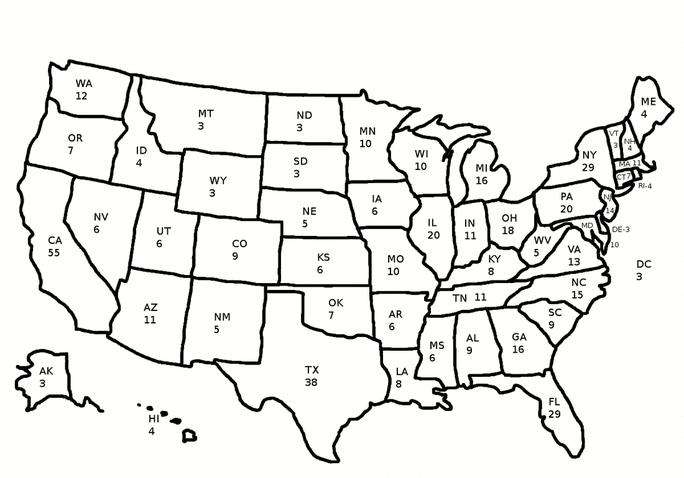
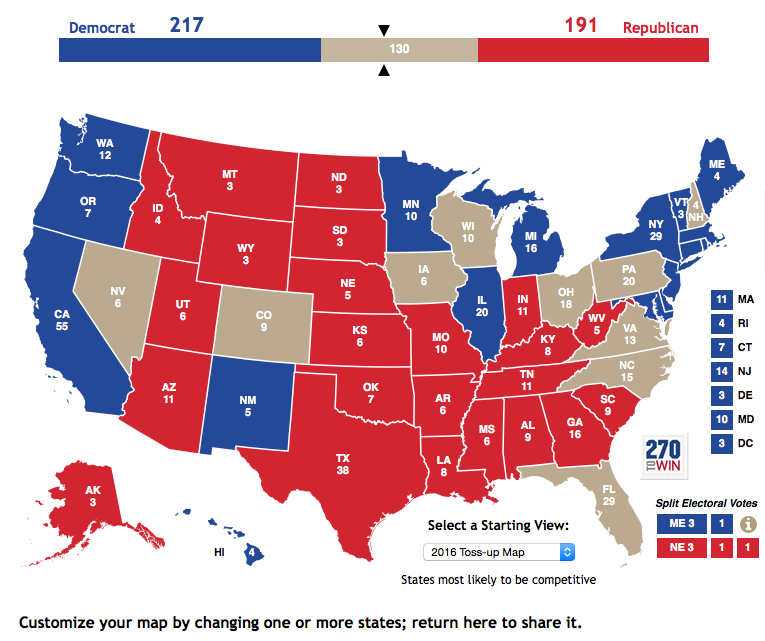
  1. Objective 6: Explain how a presidential election works and why we have an electoral college. 
Picture
Picture
Picture
Credit: http://www.c-spanclassroom.org/Images/2016ECMapLarge.jpg
The Electoral College from iCivics:
  1. "Electoral College" Drafting Board
0 Comments

Election Simulation: Political Advertising

7/4/2016

0 Comments

 
Create a blog entry using the title above.

Create advertisements that persuade others to vote for their candidate, and include screen shots of all of them on this blog post. Be sure to give each picture a caption that explains how you made the advertisement.
  • Tons of labels, cards, plastic displays, etc. are available.
  • Videos (commercials) and photo stories (for magazines/newspapers/websites) make excellent ads.
  • Use your creativity to make the best ads!

Watch this BrainPop video on Graphic Design: https://www.brainpop.com/artsandmusic/artconcepts/graphicdesign/
Picture

Reflection/Synthesis:
  1. Explain the purpose of political conventions and polls.
  2. Explain how your advertisements were designed to convince voters to vote for you.
0 Comments

Election Simulation: How Elections Work

7/4/2016

0 Comments

 
Watch the BrainPop video on Presidential Elections (republic, natural born citizen, 35, tickets, parties, campaign, primary/caucus, nominating convention, running mate, platform, issues, election day, popular vote, electoral college, oath, hanging chads, ): https://www.brainpop.com/socialstudies/usgovernment/presidentialelection/
Picture
Watch the BrainPop video on Primaries and Caucuses: https://www.brainpop.com/socialstudies/usgovernment/primariesandcaucuses/
Picture
Watch the BrainPop video on John Adams: https://www.brainpop.com/socialstudies/famoushistoricalfigures/johnadams/
Picture
Complete this activity: http://www.scholastic.com/kids/president/ and then take a screen shot of your completed newspaper article.  Put it into the following blog assignment:

Create a blog entry with the title above.

Reflection/Synthesis:
  1. Objective 3: Explain the purpose of a primary and how it works.
  2. Insert the screen shot of your newspaper article from the activity above.
  3. Simulation: Explain how you plan to convince voters that YOU will make the best president for our country.
0 Comments

Election Simulation: Political Parties

7/4/2016

0 Comments

 
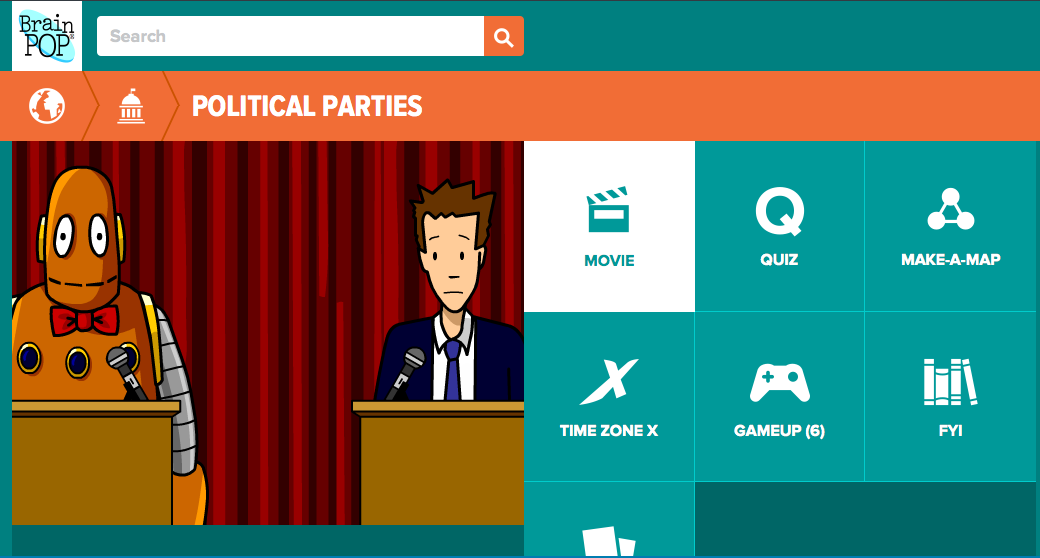
Watch the BrainPop video on Political Party Origins (George Washington, Hamilton vs. Jefferson, Adams vs. Jefferson, Federalist vs. Dem-Rep) : https://www.brainpop.com/socialstudies/ushistory/politicalpartyorigins/
Picture
Watch the BrainPop video on Political Parties (explains the origin of each and their differences): https://www.brainpop.com/socialstudies/usgovernment/politicalparties/
Picture
Watch the BrainPop video on Political Beliefs (explains choosing sides on issues, politely disagreeing, why we vote for parties, ): https://www.brainpop.com/socialstudies/usgovernment/politicalbeliefs/
Picture
Create a blog entry with the title above.

Reflection/Synthesis:
  1. Using a T-Chart, explain the traditional values of the democratic and republican parties. 
  2. Explain how political parties started.
  3. Explain why we have political parties today.
  4. Explain what third parties are and how they fit into the political system.
0 Comments

Election Simulation: Debating the Issues

7/4/2016

0 Comments

 
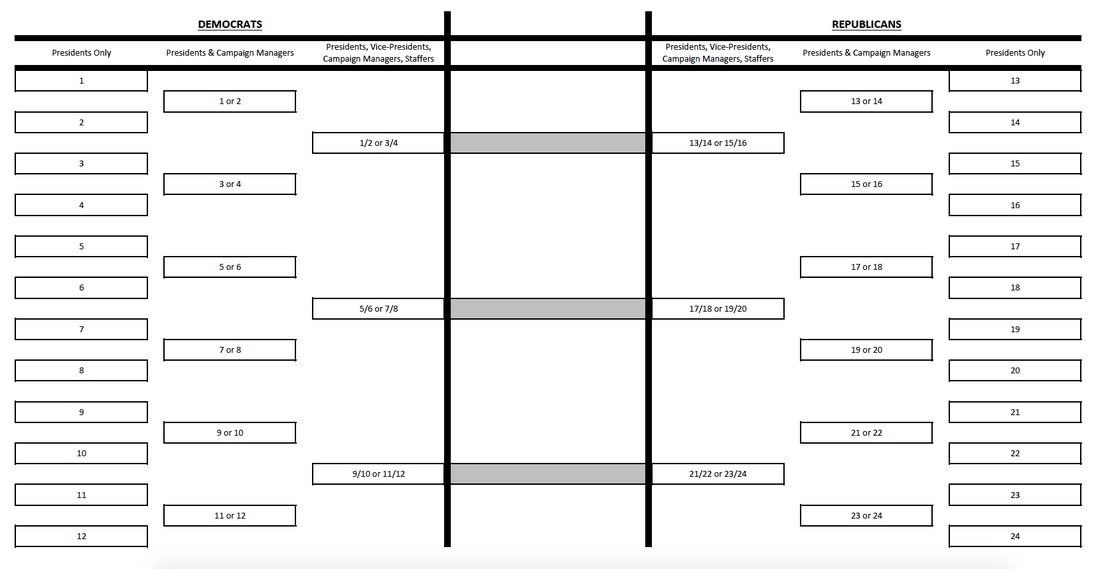
  1. Now that everyone knows which political party they lean towards, it's time to separate them into parties and give them a few issues to research and prepare to debate on. Based on their percentage of support for a candidate, separate students into democrats and republicans (be ready for some moans & groans - some of my former students were SHOCKED & angry to find out that they were opposite parties from their parents!)
  2. Since everyone is running for president at this time, we will do our debate on video (rather than in real-time).
  3. The debate format will be as follows:
    1. I announce the political issue that we will focus on for the first round and assign responsibility partners (same political party).
    2. Students determine their stance on it, based on their T-Chart and any new information they have. Based on their stance, students determine if they support their political party's stance on the issue or if they do not (here is a general guideline for Democrat/Republican stances on issues).
    3. Students explain their position on this issue on video (citing evidence & clear reasons). The more strong arguments made (with support), the more likely they are to move on to the next level. Since I do not give grades, but rather focus on improvement, students may re-record as often as needed before the voting takes place (they may need to do this on their own time). 
    4. Students tag their video "Republican" or "Democrat" on YouTube. They title it based on the issue and their first name.
    5. This process will be repeated for several issues.
    6. Growth is valued most. So the first video is worth 1 electoral college vote, the second video is worth 2 electoral college votes, the third is worth 3, etc. The eight students with the most electoral college votes become their parties candidates before the primary. We will use a Google Form to vote. Here is the link for Democrats and here is a link for Republicans.
    7. We will create 3-4 videos before determining the brackets.
  4. Students need to post all of their videos onto a blog post using the title above.
  5. They should tag their post "Election."
  6. Reflection/Synthesis:
    1. Write a paragraph describing what you learned from this activity, what was hard/easy, and why other teachers should do this activity in their classrooms.
    2. Which issue did you connect with the most? Why was it important to you? Why do you hope our future president agrees with you on this issue?
Picture
0 Comments

Order of iCivics Activities

7/4/2016

0 Comments

 
iCivics:
  1. Introducing the simulation:
    1. "All in a Day's Work" Lesson Plan
    2. "Executive Command Game" (Extension Pack)
  2. Focusing in on the issues:
    1. "Cast Your Vote" Game
    2. "Crisis of Nations" Game
  3. The Electoral College:
    1. "Electoral College" Drafting Board
  4. Interest Groups:
    1. "Interest Groups" Drafting Board
  5. Voting Age:
    1. "Voting Age" Drafting Board
  6. Final Activities:
    1. "Being President" WebQuest
    2. "Win the White House Game" (Extension Pack)
  7. Ask these questions and have students video tape their answers:
    1. What might it be like to be president?
    2. What characteristics does a good president need to have?
    3. What might it be like to live in the White House?
    4. If you were president, what would you do?
    5. What would you say to the people who voted for you?
    6. Then watch this video: https://www.youtube.com/watch?v=aFx_aiENmsc

Loosely based on this outline: http://psolarz.weebly.com/the-2012-presidential-election.html

0 Comments

Presidential Election: Lesson 2

7/3/2016

0 Comments

 
  1. Introducing the simulation from iCivics:
    1. "All in a Day's Work" Lesson Plan
      1. Sign up for iCivics: https://www.icivics.org/classes
      2. Sign up for Recap App (see image):  
      3. Teach the lesson: https://cdn.icivics.org/sites/default/files/uploads/All%20in%20a%20Day's%20Work_4.pdf#page=2&zoom=auto,-68,634
      4. Record one minute videos that answer reflection questions.
    2. Play Executive Command & put screen shot onto a blog post: https://www.icivics.org/games/executive-command
  2. Use Prezi to teach Traditional Democrat and Republican positions. Have students type notes on what they believe to be important: https://prezi.com/xke_fxgttwbe/republicans-vs-democrats/
  3. Put screen shot from the last lesson onto a blog post (Democrat or Republican).
Picture
Picture
0 Comments

Election Simulation 1: Learning About the Issues

7/2/2016

0 Comments

 
Introducing the simulation from iCivics:
  1. "All in a Day's Work" Lesson Plan
  2. "Executive Command Game" (Extension Pack)
Picture
  1. Start with a mini-lesson on political viewpoints. Explain that I don't want to know your opinions until you've researched a little because children typically choose their parents viewpoints automatically without knowing many of the facts. I don't want to know parents' political stances, and I won't share mine! :) I want to help everyone learn the facts of each issue and make a decision on which side of the issue we each stand. If your family is a strong republican family and you come out democratic (or vice-versa), you should feel fine with that because you are basing your political lean on the issues, not anything else. Fortunately for us, this is a fake simulation, not real life. :)
  2. Then, give another mini lesson on how to ignore the inappropriate topics and how to focus in on the pertinent ones. How maturity is required for our classroom and that these experiences can only happen if we're responsible and mature.
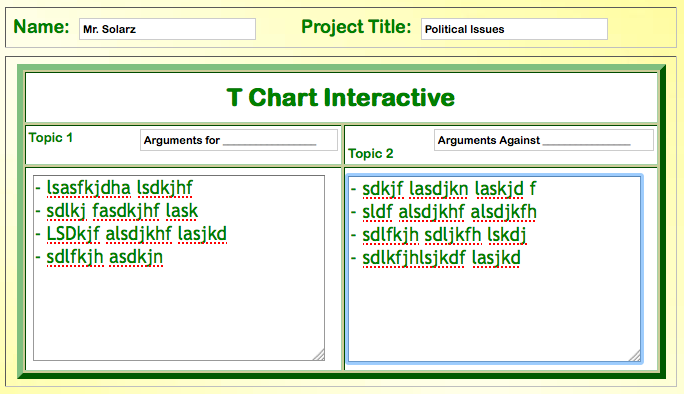
  3. Spend time researching the issues. Here is a list of the ones I feel are appropriate for 5th graders. Complete a T-Chart organizer (like the one above) that has "Arguments For" and "Arguments Against" on each side. Give students the main arguments for and against each issue to put into their organizer and have them research the rest (sharing great points with Give Me Five's as they go).
  4. Focusing in on the issues from iCivics:
    1. "Cast Your Vote" Game
    2. "Crisis of Nations" Game
  5. Visit: https://www.isidewith.com/political-quiz to vote on each of the issues. This will help us understand if we side more with Democrats or Republicans.
  6. After the vote, group students by political party. Give students a list of how political parties generally stand on the issues (Democrats/Republicans), so if they disagree with their political party, they can at least explain why they do.
  7. Prepare for Lesson 2: The first round of debates!
Picture
0 Comments

Basic Outline

7/1/2016

0 Comments

 
  1. Survey students (online) to see which political party they fall under.
  2. Organize a series of debates based on 4-6 issues at a time.
  3. Determine what makes a good speech during a debate (scoring criteria for peer-assessment & self-assessment).
  4. Give students time to research each issue and come up with their stance. They should also prepare a 60 second speech explaining their position and their plan (citing evidence whenever possible).
  5. On the day of the debate, students record their videos independently after the question has been asked. They then upload their videos to YouTube and tag it with "Debate 1."
  6. Students from their party watch each video and score it based on criteria set forth before the planning stage.
  7. Students score themselves as well.
  8. Based on their scores, students are essentially "voting" for the best candidate within their political party.
  9. The highest 50% move on to the next debate, while the lower 50% become Campaign Managers for the remaining candidates.
  10. Repeat this process with the bottom 50% becoming Vice-Presidential candidates. Students from the party choose the running mates rather than the presidential candidate. The incentive is that the winning political party will get an advantage when we start our next simulation (Revolutionary War).
  11. The final debate will have the Presidents & VPs for each political party together and it will be live. The campaign managers can help prepare for the debate, but cannot help during the actual debate.
  12. Propose some scenarios that could happen while a president is in office (in addition to the standard issues) and see how they would respond. This will help the voters determine who they trust most.

0 Comments

    The 2016 Presidential Election Simulation

    We're all running for president and there's no mention of Trump or Hillary! We're expecting it to be a fun ride!

    Archives

    September 2016
    August 2016
    July 2016

    Categories

    All

    RSS Feed

Powered by Create your own unique website with customizable templates.